Welcome to MrRobot5's Blog!
记录源码阅读心得、工作遇到的问题-
web 请求拦截方案和 chrome extensions
案例-浏览器请求增加自定义 Header
在项目开发过程中,需要给 web 请求统一添加 Header, 后端会根据是否有自定义Header 决定是否是超管权限。方便开发和线上调试。
通过使用 Chrome 插件,可以给每个 web 请求添加自定义 Header,并且不会影响正常工程代码。
插件名称:Modify-http-headers。
/**
 * 后端示意代码
 * 超管功能,登录PIN 替换,用于特殊场景的调试。 org.springframework.web.servlet.HandlerInterceptor
 */
@Slf4j
public class AuthInterceptor extends HandlerInterceptorAdapter {

    /**
     * 超管PIN header,仅用于调试
     */
    private static final String SUPER_PIN_HEADER = "super-pin";

    @Override
    public boolean preHandle(HttpServletRequest request, HttpServletResponse response, Object handler) throws Exception {
        String superPin = request.getHeader(SUPER_PIN_HEADER);
        // 如果Http 请求有自定义 Header, 并且当前用户属于超管, 可以进行登录用户替换。
        if (StringUtils.isNotBlank(superPin) && inWhiteList(getCurrentPin(request))) {
            AuthContext context = new AuthContext();
            context.setPin(superPin);
            setAuthContext(context);
        }
        return true;
    }
}
web 请求拦截方案
-
代码中编写, Jquery/ axios 都支持拦截器。
可以根据不同的运行环境,决定是否添加自定义的Header。
不建议这种方式,对代码有污染,还有安全隐患。
-
Fiddler
非常方便的Http 拦截代理工具。
-
Chrome extensions
浏览器插件实现功能注入和增强。借助 Chrome 提供的丰富API,可以实现各种想要的特性。
-
Chrome Source Override
本地调试很方便 使用Chrome开发者工具overrides实现不同环境本地调试
Chrome extensions
Extensions are software programs, built on web technologies (such as HTML, CSS, and JavaScript) that enable users to customize the Chrome browsing experience.
enhance the browsing experience✨
①插件开发相关
插件开发教程 Chrome Extension development basics - Chrome Developers
API 能力总览 Chrome Extension development overview - Chrome Developers
官方案例 Extensions - Chrome Developers
❤注意事项
-
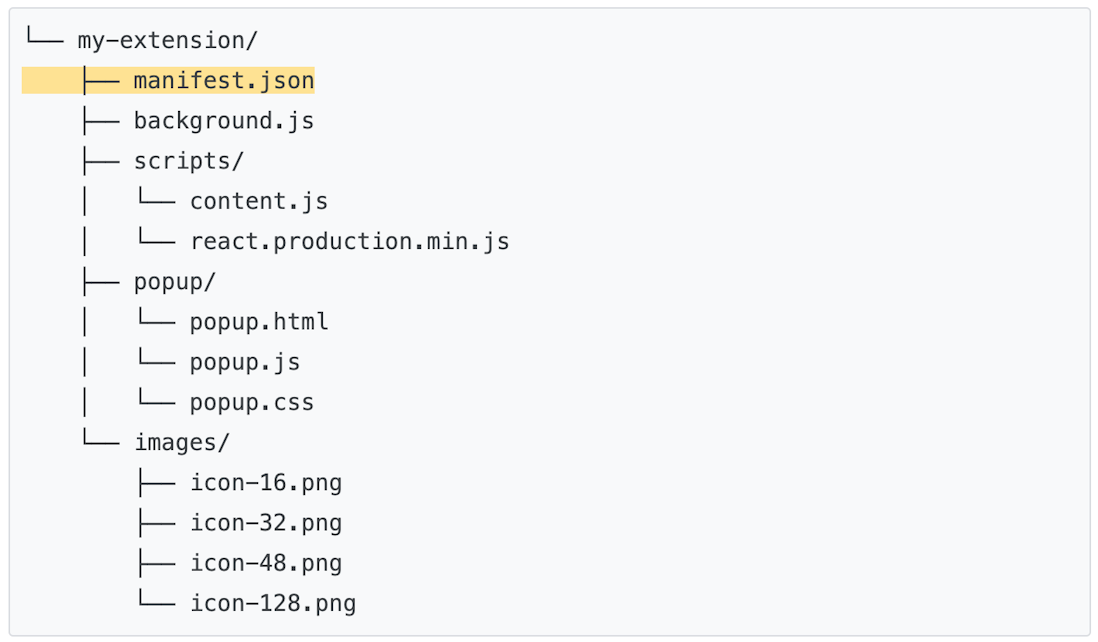
manifest.json 是必备文件,用来声明和定义插件。
-
根据插件的需求,Chrome 插件分为Content scripts、Service worker、The popup 形式。
-
permission 声明非常重要。使用对应的API 能力,需要在manifest声明对应的权限。
-
快速打开插件管理
chrome://extensions -
可以使用console 和 开发者工具调试插件问题
🧡插件推荐的工程结构
②chrome.webRequest
Use the
chrome.webRequestAPI to observe and analyze traffic and to intercept, block, or modify requests in-flight.上述案例拦截 web 请求,添加自定义 header 就是通过调用
chrome.webRequestAPI 实现。// 上述案例使用的插件 Modify-http-headers, 核心实现。 chrome.webRequest.onBeforeSendHeaders.addListener(function(details){ var headerInfo = JSON.parse(localStorage['salmonMHH']); for (var i = 0; i < headerInfo.length; i++) { details.requestHeaders.push({name: headerInfo[i].name, value: headerInfo[i].value}); } return {requestHeaders: details.requestHeaders}; }, filter, ["blocking", "requestHeaders"]); "requestHeaders"]);
-
-
SpringBootTest 使用过程中遇到的冷门问题
问题描述
使用SpringBootTest 测试DAO 逻辑时,直接报错:
java.lang.NoSuchMethodException: tk.mybatis.mapper.provider.base.BaseSelectProvider.<init>()从异常日志分析,是 tk.mybatis 的增强方法初始化问题。可是,启动工程调用该DAO 方法,是正常执行的,那么问题是出在哪呢?
@Slf4j
@RunWith(SpringRunner.class)
@SpringBootTest(classes = WebApplication.class)
public class ApplicationTests {

    @Autowired
    private DictionaryMapper dictionaryMapper;

    @Test
    public void baseMapperTest() {
        int count = dictionaryMapper.selectCount(null);
        Assert.assertTrue(count > 0);
    }

}
同时,测试目录下,还有一个空的SpringBootApplication,主要是用于纯Spring 容器的一些逻辑测试(不加载RPC接口、DAO, 不初始化Redis 等)
/src/test/java/com/foo/EmptyApplication.java
@Slf4j
@SpringBootApplication(scanBasePackages = "com.foo.service", exclude = {RedisAutoConfiguration.class, MybatisAutoConfiguration.class, RPCAutoConfiguration.class})
public class EmptyApplication {

}
问题分析
tk.mybatis 的异常
关于tk.mybatis 增强类初始化异常的问题,可以直接翻看之前的笔记可以解决。这里。
现在的问题是,只有在SpringBootTest 运行单测方法才会异常。推测是SpringBootTest 某种机制,导致MapperAutoConfiguration 没有loadClass 或者没有执行。
MapperAutoConfiguration 检测
通过查看DEBUG 日志,发现MapperAutoConfiguration 正常load,只是因为不符合匹配条件,没有注册到Spring 容器,所以没有正常执行初始化。
 MapperAutoConfiguration:
   Did not match:
     - @ConditionalOnBean (types: org.apache.ibatis.session.SqlSessionFactory; SearchStrategy: all) did not find any beans (OnBeanCondition)
通过源码,我们可以看到,明明指定了加载顺序,为什么会匹配失败?
@ConditionalOnBean(SqlSessionFactory.class)
@AutoConfigureAfter(MybatisAutoConfiguration.class)
public class MapperAutoConfiguration {
}
EnableAutoConfiguration 加载顺序
根据之前的Insight 笔记,可以直接跳到 org.springframework.boot.autoconfigure.EnableAutoConfigurationImportSelector#getCandidateConfigurations
通过断点调试分析,发现上述提到的EmptyApplication 也load 到容器中了,由于配置了exclusions,直接剔除了MybatisAutoConfiguration。容器中的EnableAutoConfiguration 组件集合是两个SpringBootApplication 扫描结果的合并。这样看来,确实是没法保障初始化顺序。
那么问题又来了,我们的SpringBootTest 明确指定了启动配置类,为什么EmptyApplication 也会掺和进来?
SpringBootApplication 加载过程
通过源码分析,springboot 是以WebApplication 作为启动类。
但是,由于EmptyApplication 属于 Configuration,在初始化过程中,正常加载到容器中。这时候容器中就存在两个 SpringBootApplication。自动配置等组件也是这两个 Application 共同扫描的集合。
关键信息
-
SpringBootApplication 声明并启用了EnableAutoConfiguration。
-
EnableAutoConfiguration 是通过EnableAutoConfigurationImportSelector 来实现的。
-
上述EnableAutoConfiguration 加载就是EnableAutoConfigurationImportSelector 执行扫描导入实现的。
相关的源码逻辑
/**
 * Build and validate a configuration model based on the registry of
 * Configuration classes.
 * @see org.springframework.context.annotation.ConfigurationClassPostProcessor#processConfigBeanDefinitions
 */
public void processConfigBeanDefinitions(BeanDefinitionRegistry registry) {

    // Parse each @Configuration class
    ConfigurationClassParser parser = new ConfigurationClassParser(
            this.metadataReaderFactory, this.problemReporter, this.environment,
            this.resourceLoader, this.componentScanBeanNameGenerator, registry);

    do {
        // parse 过程中,引入EmptyApplication。由于EmptyApp 指定exclude MybatisAutoConfiguration,在两次排序合并后,添加到了最后。打乱了 EnableAutoConfiguration 的顺序。
        parser.parse(candidates);
        parser.validate();
    }
}
总结
-
最复杂的问题,原因总是很简单。
-
这个问题与环境没有关系,与 SpringBootTest 也没有关系,是 SpringBoot 加载机制的问题。
-
工程里尽量不要写多个 SpringBootApplication ,避免不必要的麻烦。目前使用的版本:spring-boot-autoconfigure-1.5.10.RELEASE
-
-
Spring Boot DataSource 知识梳理
梳理 Spring Boot 默认配置的数据库和连接池,以及自定义配置的方法
database
Spring Boot gives you defaults on all things. For example, the default database is H2.
Consequently, when you want to use any other database, you must define the connection attributes in the application.properties file.
①default
# org.springframework.boot.autoconfigure.jdbc.EmbeddedDatabaseConnection#H2
# 内嵌数据库支持 H2 Derby Hsqldb,首选 H2。
spring.datasource.url=jdbc:h2:mem:%s;DB_CLOSE_DELAY=-1;DB_CLOSE_ON_EXIT=FALSE
spring.datasource.username=sa
spring.datasource.password=
spring.datasource.driver-class-name=org.h2.Driver
②自定义
spring.datasource.url=jdbc:mysql://${MYSQL_HOST:localhost}:3306/db_example
spring.datasource.username=springuser
spring.datasource.password=ThePassword
spring.datasource.driver-class-name=com.mysql.cj.jdbc.Driver
#spring.jpa.show-sql: true
③Code Insight
/**
 * 查找最匹配的 EmbeddedDatabaseConnection
 * Spring Boot 内置EmbeddedDatabaseConnection 配置。作为 DataSourceProperties 托底配置。
 * 如果没有指定的DatabaseConnection,就会取 EmbeddedDatabaseConnection。
 * @see org.springframework.boot.autoconfigure.jdbc.DataSourceProperties
 * @see org.springframework.boot.autoconfigure.jdbc.EmbeddedDatabaseConnection
 */
public static EmbeddedDatabaseConnection get(ClassLoader classLoader) {
	if (override != null) {
		return override;
	}
	// 按照定义顺序,遍历 H2 Derby Hsqldb
	for (EmbeddedDatabaseConnection candidate : EmbeddedDatabaseConnection.values()) {
		// 如果存在数据库 DriverClass,就返回对应数据库的 Connection
		if (candidate != NONE && ClassUtils.isPresent(candidate.getDriverClassName(), classLoader)) {
			return candidate;
		}
	}
	return NONE;
}
-
spring boot starter 开发知识梳理
示例
pagehelper/pagehelper-spring-boot
关键要素
①auto-configure Module
-
auto-configure class
-
META-INF/spring.factories
②starter Module
- pom.xml (用于依赖引入和auto-configure 引入)
关键类
-
org.springframework.context.annotation.Configuration
-
org.springframework.boot.context.properties.EnableConfigurationProperties
调试和排查
①对照上述的关键要素,看是否有缺失
②检查是否有加载 spring.factories
org.springframework.core.io.support.SpringFactoriesLoader
③开启 DEBUG 日志,Spring Boot 会输出 AUTO-CONFIGURATION REPORT 根据
Negative matches判断原因。org.springframework.boot.autoconfigure.logging.ConditionEvaluationReportMessage
-
-
Yaml in Spring Boot
起因
在使用 Spring Boot 配置工程时,发现并没有按照预期解析。疑问:是yaml 的解析规则还是 Spring Boot 解析规则?
# yaml 配置
alias:
  52: s52-online

# springboot 解析完成的key-value
# alias[52] -> s-52-online
Spring Boot 对yaml properties的处理
/**
 * YamlProcessor to create a Map containing the property values.
 * @see org.springframework.boot.env.YamlPropertySourceLoader.Processor#process
 */
public Map<String, Object> process() {
    final Map<String, Object> result = new LinkedHashMap<String, Object>();
    process(new MatchCallback() {
        // loadYaml完成后的object 强制转换为 map数据结构
        public void process(Properties properties, Map<String, Object> map) {
            // 拍平map数据结构,最终得到的是 property values
            result.putAll(getFlattenedMap(map));
        }
    });
    return result;
}
首先,processor 会针对yaml 读取完的结果进行处理,主要就是把number keys 转为string keys。
// 得到的数据:{alias={[52]=s-52-online}}
private Map<String, Object> asMap(Object object) {
    // YAML can have numbers as keys
    for (Entry<Object, Object> entry : map.entrySet()) {
        Object key = entry.getKey();
        if (key instanceof CharSequence) {
            result.put(key.toString(), value);
        }
        else {
            // It has to be a map key in this case
            result.put("[" + key.toString() + "]", value);
        }
    }
    return result;
}
然后,再把map 拍平,得到最终的the property values。
private void buildFlattenedMap(Map<String, Object> source, String path) {
    for (Entry<String, Object> entry : source.entrySet()) {
        String key = entry.getKey();
        if (StringUtils.hasText(path)) {
            // 针对上述number keys的key,直接追加到path,得到的就是 alias[52]
            if (key.startsWith("[")) {
                key = path + key;
            }
            else {
                key = path + '.' + key;
            }
        }
        // ... value 拍平处理,理论上只有String, Map, Collection
    }
}
yaml 文件读取浅析
yaml 是一种文件格式的规范,YAML Version 1.1。
java 读取yaml使用到的第三方库:snakeyaml。SnakeYAML Engine Documentation。
snakeyaml 是根据YAML规范实现的。
YAML 基本概念
Representation Graph相关:
Nodes: YAML nodes have content of one of three kinds: scalar, sequence, or mapping.
处理相关:
Parse : Parsing is the inverse process of presentation, it takes a stream of characters and produces a series of events.
Compose : Composing takes a series of serialization events and produces a representation graph.
Construct : The final input process is constructing native data structures from the YAML representation.
snakeyaml 关键实现
// yaml load file
new Composer(new ParserImpl(new StreamReader(new UnicodeReader(input))), new Resolver());
第三方库实现针对规范中的定义进行了具体的实现,对功能进行了清晰明确的划分。